Web Development Roadmap for Beginners (2026)
Introduction
Web development in 2026 continues to evolve into one of the most creative, impactful, and opportunity-rich fields in technology. Modern frameworks, cloud platforms, AI-assisted coding tools, serverless architecture, and performance-driven design principles have reshaped how applications are built and deployed. For beginners, this journey may feel complex at first HTML, CSS, JavaScript, backend systems, APIs, databases, deployment, security, and version control but when approached gradually and systematically, it becomes a highly rewarding learning experience. This roadmap is designed as a complete beginner-friendly learning guide, explaining every stage in depth, from foundational concepts to full-stack awareness, real-world workflows, coding practice strategy, and project development growth.
This article avoids shortcuts and surface-level explanations. Instead, it focuses on helping learners understand how technologies connect together how the browser renders markup, how layouts respond to screens, how JavaScript controls logic, how APIs communicate with servers, how databases store structured data, and how deployed systems operate in real-world environments. The goal is not just to write code, but to think like a developer — structured, analytical, and progressively improving through practice, reflection, and real-world application.
Understanding How the Web Works
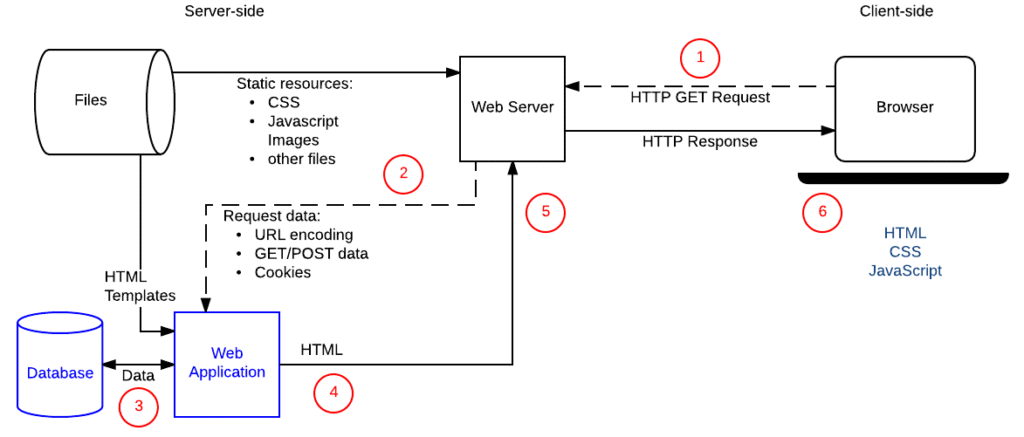
Every learning journey begins with understanding how a website actually functions behind the scenes. A website is not just a page on a screen it is a communication process between the browser (client), the server, and the database. When a user opens a webpage, the browser sends a request, the server processes logic, retrieves data if needed, and sends a response that the browser renders using HTML, CSS, and JavaScript. This lifecycle request → processing → response → rendering forms the backbone of modern web applications.
Understanding this concept helps beginners overcome fear of complexity. Instead of memorizing syntax, they begin to visualize flow: how images, scripts, fonts, and styles load; how network calls retrieve API data; how dynamic applications behave differently from static ones; and how rendering may occur on the client or server side depending on performance strategy.
Key Points
- The browser is the client and the server processes the request
- HTML structures content, CSS controls presentation, JavaScript adds behavior
- The internet transfers data using HTTP / HTTPS protocols
- APIs allow applications to exchange information
- Databases store structured user-generated data
- Static websites load directly, dynamic websites process logic
- Rendering may happen on client or server side
- Understanding flow prevents confusion later
- Foundation knowledge builds stronger learning discipline
HTML - The Structural Layer of the Web
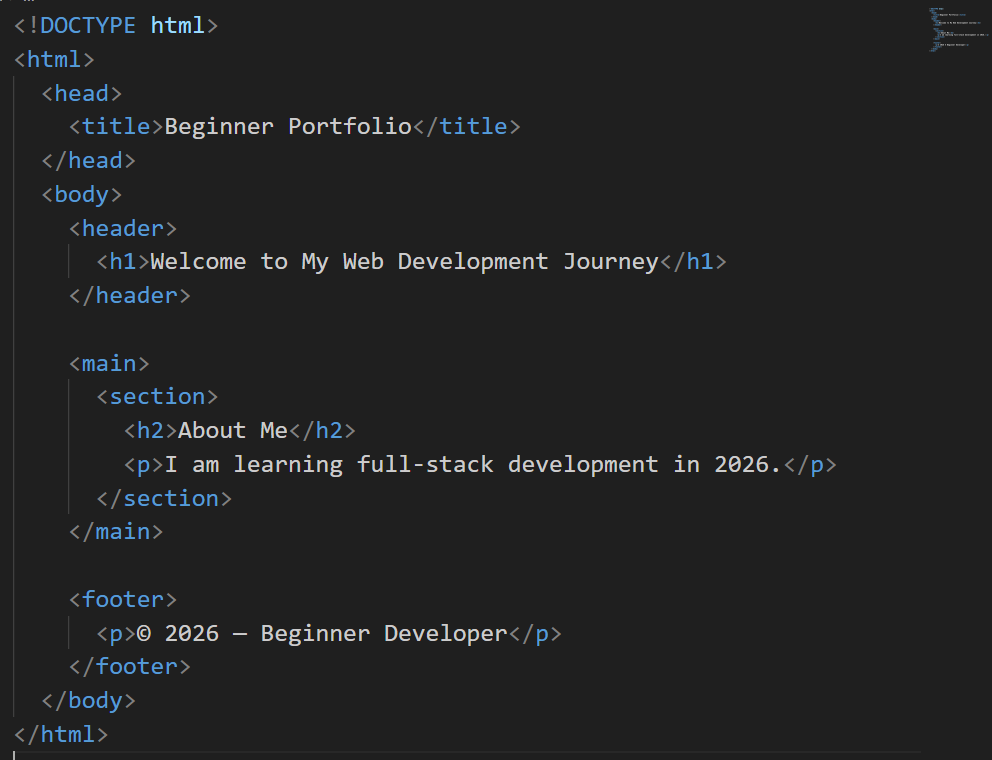
HTML (HyperText Markup Language) is the backbone of every webpage. It defines structure, hierarchy, semantics, and meaning. Beginners should not treat HTML as “just tags” — instead, it should be viewed as a content blueprint that improves accessibility, search optimization, and readability. Elements like headers, paragraphs, lists, navigation blocks, forms, and media containers define logical document flow. Semantic elements such as <header>, <main>, <section>, <article>, and <footer> help browsers, screen readers, and search engines understand content purpose.
Code Example
CSS -Designing Layout, Theme, and Visual Identity
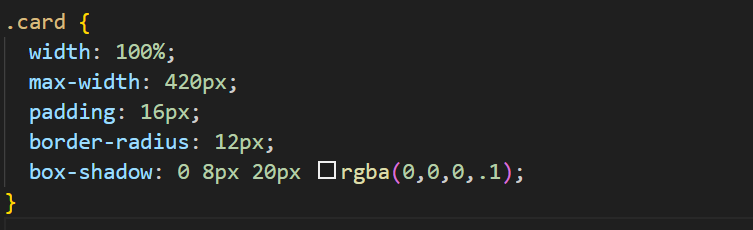
CSS transforms plain HTML into visually appealing interfaces. Beginners learn typography, spacing, color systems, responsive grids, and component-based styling. Instead of memorizing properties, they should focus on layout thinking how elements behave inside flexible containers and how responsive design adapts to screens.
Code Example
Key Points
- CSS controls spacing, theme, layout, and hierarchy
- Responsive design ensures usability across devices
- Flexbox and Grid enable modern layout architecture
- Components improve reusability and consistency
- Animations enhance interactive experience
- Frameworks like Tailwind & Bootstrap accelerate styling
- Browser DevTools help inspect layout behavior
JavaScript - Logic, Interactivity, and Dynamic Behavior
JavaScript brings pages to life. It enables events, UI interactions, animations, form validation, and API data rendering. Instead of jumping to frameworks too early, beginners should understand functions, loops, objects, and DOM manipulation first.
Code Example

Version Control - Git & GitHub
Version control is essential for professional development. Git allows tracking progress, undoing mistakes, collaborating safely, and deploying builds.
Key Features
- Commit history maintains development timeline
- Branching supports experimentation
- Pull requests enable teamwork
- GitHub hosts repositories and documentation
- Industry projects require proper version tracking
Frontend Frameworks - React & Next.js (2026)
Modern frontend development relies on component architecture. React and Next.js dominate industry workflows by enabling reusable UI components, routing, server-side rendering, and API integration.
Key Points
- Components improve modular development
- State management handles dynamic data
- Hooks simplify lifecycle logic
- Next.js supports server-rendering & static builds
- Performance improves via optimized bundling
- Developer ecosystem is mature and widely adopted
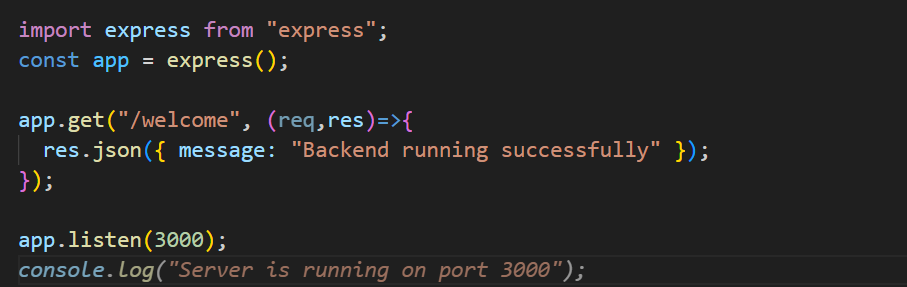
Backend Development - Node.js & Express
Backend development manages business logic, authentication, and API endpoints.
Code Example
Key Features
- Handles requests and routes
- Processes user actions
- Connects to databases
- Secures sensitive operations
Databases - Understanding Data Persistence
Databases transform applications from static to meaningful systems.
MongoDB, PostgreSQL, and MySQL remain top beginner-friendly choices.
Key Concepts
- Structured vs. document storage
- CRUD operations
- Relationships and indexing
- Data validation
- Secure access layers
APIs - Connecting Frontend and Backend
APIs enable communication between client and server.
Key Points
- REST APIs handle data exchange
- JSON formats structure data
- Authentication protects endpoints
- Postman assists testing
- Fetch & Axios retrieve responses
Full-Stack Development - Integrating Every Layer
Full-stack learning unites frontend UI, backend processing, routing, and databases into one cohesive architecture. Developers now understand entire request lifecycles from user action to API execution to stored results.
Key Points
- Builds end-to-end system thinking
- Enhances debugging and architectural vision
- Encourages modular and scalable design
- Improves career flexibility
- Connects theory to real application behavior
- Strengthens deployment awareness
- Matches real industry project environments
- Prepares learners for production work
Deployment & Hosting - Bringing Projects Online
Deployment converts personal projects into live, publicly accessible applications. Platforms such as Vercel, Netlify, Render, and AWS teach build pipelines, HTTPS setup, runtime configuration, logging, error handling, and performance monitoring. This step marks the transition from practice to real-world accountability.Once a project goes live, stability, accessibility, and reliability become meaningful responsibilities — forming the mindset of a professional developer. Deployment converts local projects into live applications. Platforms beginners should learn:
- Vercel
- Netlify
- Render
- AWS
Learners understand:
- Build pipelines
- Domains & HTTPS
- Server runtimes
- Logs & monitoring
Performance Optimization & Security Awareness
Mature developers balance functionality with performance and safety. They optimize rendering, reduce load time, compress assets, implement authentication layers, encrypt data, and validate user input. Performance quality and security responsibility determine real-world reliability especially in production environments.
Practical Learning Workflow for Beginners
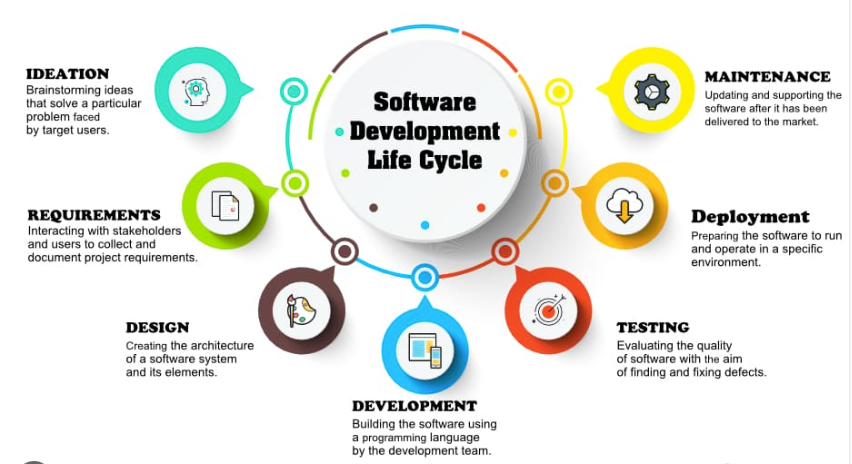
A professional learning approach follows a structured development cycle:
Plan → design → build → integrate → test → document → deploy → refine
This workflow builds discipline, confidence, and meaningful growth.
Future Direction of Web Development
The future of web development moving into 2026 and beyond is shaped by intelligence, automation, real-time interaction, and deeply integrated cloud ecosystems. Websites are no longer just static pages or simple interactive platforms they are evolving into immersive digital environments powered by AI-driven personalization, predictive user behavior, and adaptive user interfaces that change based on context and intent. Developers will increasingly work with serverless architectures and edge computing, where applications process data closer to the user to reduce latency and improve performance. Instead of managing traditional servers, beginners and professionals alike will rely on cloud-native workflows, container environments, and automated deployment pipelines that continuously build, test, and optimize applications in real time. JavaScript will continue as a core pillar of the web, but the ecosystem will shift toward strongly typed environments, modular codebases, reusable components, and framework-agnostic architectures that encourage scalability and long-term maintainability.
Artificial intelligence will become an active collaborator in development rather than just a utility tool. Code assistants will analyze patterns, suggest architecture improvements, detect logical issues, and even generate foundational components for full-stack systems. However, instead of replacing developers, AI will demand stronger problem-solving skills, conceptual understanding, and architectural thinking, because real-world systems require judgment, security awareness, and structural design insight that automation cannot fully replicate. The role of the developer will move from simply writing code to designing workflows, validating logic, modeling data, and integrating intelligent services across APIs, automation pipelines, and distributed platforms. Learning how to communicate with AI tools, guide system behavior, and refine auto-generated logic will become a key professional capability.
Performance, accessibility, and security will carry even greater importance as applications scale globally. Users expect instant interaction, offline-first experiences, and seamless synchronization across devices, which means developers must focus on optimized rendering, code-splitting, caching strategies, and encrypted communication channels. Authentication, authorization, and secure input handling will shift from technical checklists to core engineering principles, especially as financial systems, healthcare platforms, and enterprise dashboards expand into fully web-based environments. Progressive Web Apps, real-time collaborative interfaces, and streaming-based UI updates will redefine how users experience digital systems, blending the qualities of native software and web applications into unified experiences.
Beginners entering the ecosystem in this era must approach learning with a project-driven, deployment-focused mindset rather than memorizing syntax or isolated concepts. The future rewards developers who understand architecture flow, database relationships, integration layers, and deployment life cycles. Images such as system architecture diagrams, API interaction models, UI wireframes, and deployment pipelines will be essential when studying or documenting projects, because they help visualize how every layer connects and operates together. The path forward is not just about mastering tools it’s about thinking like a system designer, building real-world applications, refining them through iteration, and evolving alongside the rapidly changing technology landscape. In 2026 and beyond, web development becomes a continuous craft where curiosity, consistency, structured thinking, and lifelong learning shape the strength and depth of a developer’s professional journey.